
How to Use WeChat 🤔 The Complete 2026 Guide for Foreigners

Quick answer: To use WeChat as a foreigner in 2026, download the app from the App Store or Google Play, register with any international mobile number, set a permanent Weixin ID, and add contacts via QR code or Weixin ID search.
Link a Visa or Mastercard to activate WeChat Pay for cashless payments in China, then use core features like group chats, voice-to-text, Mini Programs, Moments, and voice or video calls.
The international WeChat and Chinese Weixin share the same platform, so you can message, call, and pay across borders from day one.
As an expat in China, WeChat known as Weixin 微信 is probably one of the most important apps you’ll download…
You’ll almost certainly find yourself using it every day. When first coming to China, you may find yourself missing the familiarity of WhatsApp.
But with WhatsApp being blocked in China, you’ll find yourself using it less and less. Until WeChat/Weixin slowly but surely takes over your life, especially as WeChat Pay will replace your cash and cards in no time.
👉 Not to mention the WeChat app trumps WhatsApp in so many ways (in our humble opinion).
If you do find yourself with an urge to use WhatsApp or can’t quite let go, or can’t get your mates back home to download WeChat, you’ll need a VPN to access it.
And if you want to go beyond WeChat, check out our full list of must-have apps for life in China while you’re at it.
But how to use WeChat and what things can I learn right now?
Registration and Adding Contacts
Voice and Video Calls on WeChat
WeChat Account Frozen or Blocked? Here’s What to Do

What is WeChat?
WeChat (微信, Wēixìn) is a super-app developed by Tencent, launched in 2011. As of 2026 it has over 1.3 billion monthly active users, making it one of the world’s most-used apps.
Inside China the app is called Weixin (微信). Outside China it is branded WeChat. They share the same platform, but accounts registered on Chinese phone numbers (Weixin) and international numbers (WeChat) have slightly different feature sets, particularly around payments.
What makes it a ‘super-app’? Think messaging, video calls, mobile payments, social feed, mini-programs, news subscriptions, taxi booking, food delivery, and hospital appointments, all inside one app.
If you’re heading to Beijing, Shanghai, or anywhere else in China, WeChat isn’t optional. It’s infrastructure. 💡
TIP💡 Download WeChat from the official App Store (iOS) or Google Play (Android) before you travel. Search ‘WeChat’ by Tencent. The international version works fine on a non-Chinese number.
So you’ve been in China working or studying (or both) for a while now, and you think using WeChat every day means that you’ve pretty much cracked how to use the app and make sure you’re getting the most out of the WeChat experience.
Well, as a savvy WeChat user you may have discovered all of its best features. If so, congratulations!
However, after using it for years we’re still finding new, super convenient features that no one seems to talk about or use too much. At least in the expat world.
So here’s the full walkthrough, from account setup to the features that will genuinely change how you use WeChat.

Setting Up WeChat || Registration and Adding Contacts
Creating your account
- Download WeChat from the App Store or Google Play.
- Tap Sign Up and enter your mobile number (any international number works).
- You’ll receive an SMS verification code. Enter it to confirm your number.
- Set a profile photo and display name.
- WeChat will prompt you to set a Weixin ID (your permanent username). Choose carefully: you can only change it once.
TIP💡 Set your Weixin ID early. Once locked in, you’re stuck with it. Keep it simple so friends can search for you. The default usernames can be super long and not in any way user friendly!
Adding contacts on WeChat
There are three main ways to find and add people:
- Weixin ID search: Tap the search icon and type their Weixin ID or phone number directly.
- QR code scan: Every WeChat user has a personal QR code. Tap the ‘+’ icon, select ‘Scan’, and point your camera at their code. Fast and foolproof for in-person meetings.
- ‘People Nearby’: WeChat has a proximity feature. Useful at events, though many users keep it switched off for privacy.
When someone sends you a friend request, you’ll see it under Contacts > New Friends. Tap Accept and you’re connected. 🤝
WeChat Pay for Foreigners || How to Set It Up and Use It
WeChat Pay (微信支付, Wēixìn Zhīfù) is how most people in China pay for everything: street food, taxis, supermarkets, hospitals. Cash is rarely used. Knowing how to use it before you land saves a lot of stress.
Can foreigners use WeChat Pay?
Yes. Since 2023, Tencent has allowed international visitors to link a foreign Visa or Mastercard directly to WeChat Pay without needing a Chinese bank account. You will need:
- A valid passport
- An international Visa or Mastercard debit or credit card
- Your WeChat account to be at least a few days old (to pass anti-fraud checks)
Step-by-step setup
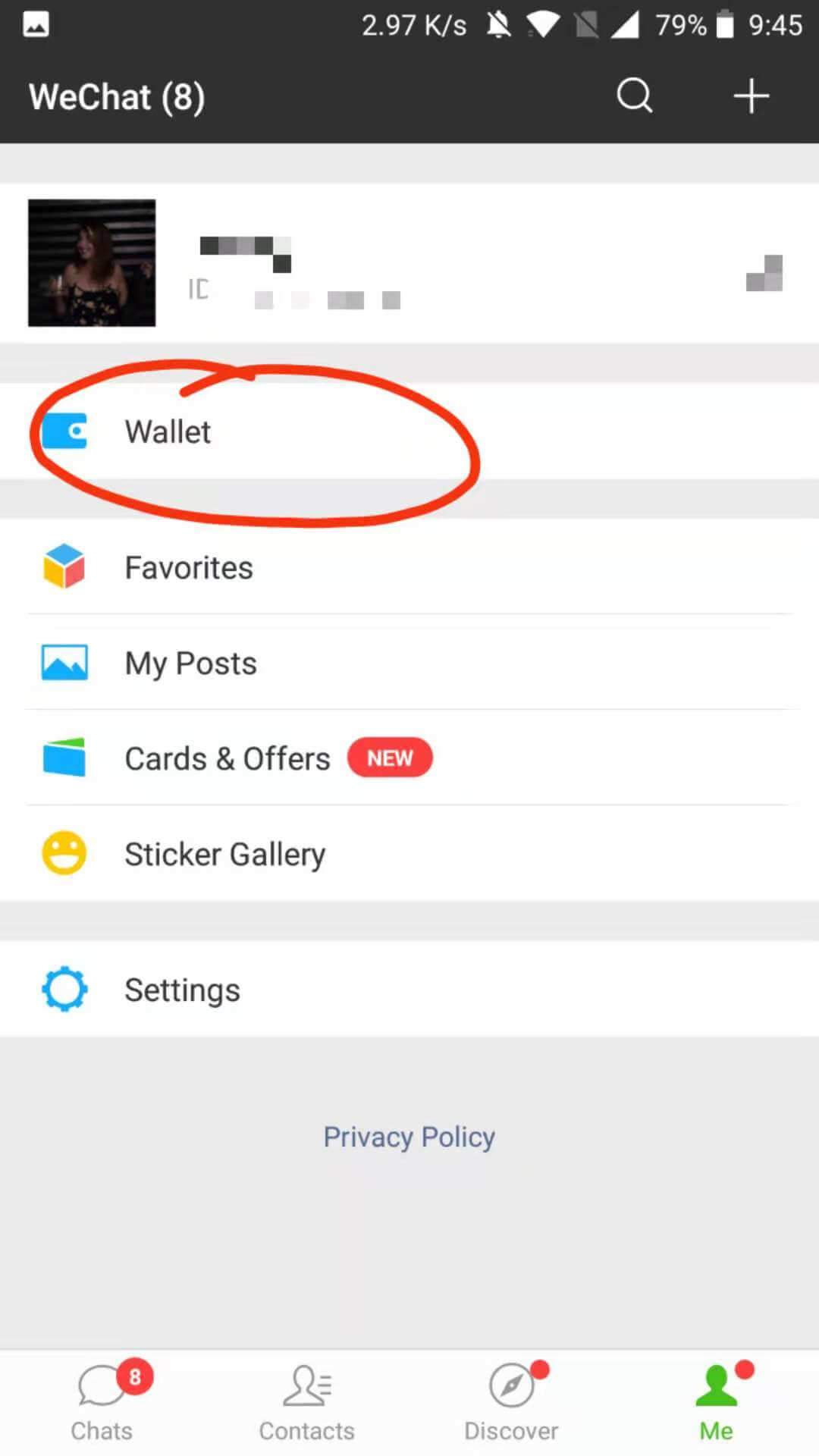
- In WeChat, tap Me (bottom right) then Services.
- Tap Wallet, then Cards.
- Select Add a Card and enter your Visa or Mastercard details.
- Complete the real-name verification: enter your passport name exactly as printed and your passport number.
- Set a payment PIN.
TIP💡 Some US-issued cards face extra verification steps or occasional declines due to bank-side restrictions. If your card is declined, try a Mastercard debit card first, as these tend to have fewer issues than credit cards.
Paying in stores
There are two ways to pay:
- You scan the merchant: Tap the ‘+’ icon in any chat or go to Me > Services > Wallet > Pay. A QR scanner opens. Point it at the merchant’s QR code and confirm the amount.
- Merchant scans you: Go to Me > Services > Wallet > Receive Money. Your personal payment QR code appears. The cashier scans it.
For more detail on how WeChat Pay and Alipay compare as payment options in China, see our guide to WeChat Pay and Alipay compared.
Planning a trip to Beijing, Shanghai, or another Chinese city? If you want to get the most out of daily life there, speaking even basic Mandarin makes a real difference. Find your perfect Mandarin program with LTL and arrive ready.
WeChat Pay for Foreigners || The Complete Guide for 2026
Step aside, cash and cards. WeChat Pay is here! And we’re here to tell you how to set up WeChat Pay and how visitors can link their international cards
How to Use WeChat || Convert Voice Message to Text
Sending voice messages in China is a very common way to communicate amongst Chinese and expats alike.
You’ll surely see many Chinese people on the street talking into their phones and sending voice messages since this is the preferred method rather than texting.
Use WeChat for a few weeks and you’ll soon realise just how super convenient it is to send a voice message instead of typing out a massive message!
The downside to receiving voice messages, however, is that you’re not always in a position to listen to them.
If you’re watching a movie or stuck in the office and can’t listen to your friend’s mini podcast, WeChat has a solution: convert voice messages to text!
Today, this function works best with Mandarin, but it can also recognize basic English depending on your device and system language. Accuracy has improved significantly, making it a practical everyday tool for both locals and expats.
But for now, you can use it whilst chatting with your Chinese buddies!

WhatsApp vs WeChat 🥊 The Ultimate Debate | Who Wins The Battle?
WhatsApp vs WeChat. Everyone has their own personal preference. But there’s having your own personal preference, then there’s just being smart.
How to use WeChat Voice to Text Converter?
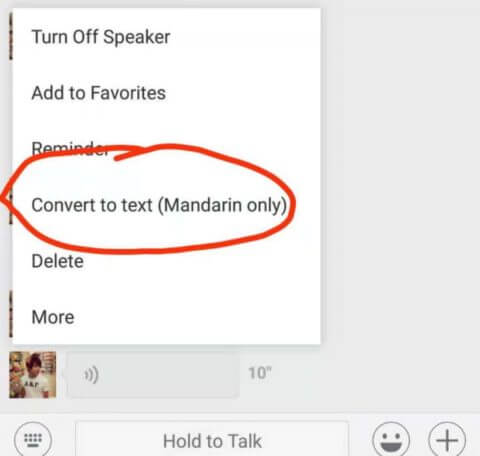
Get a voice message from a friend.
Hold the voice message down and a menu bar will appear:
Click the “Convert to text” button.
And, hey presto!
The sender’s text is transcribed out for you:
Looks like I’m going for dinner tonight..!
Sure, if your Chinese friend’s Chinese is particularly accented or not so clear, it won’t be perfect. Bear that in mind.
TIP💡 It may not work 100% of the time, but it works well enough that you’ll get the gist either way.
Give it a go next time you receive a long Mandarin voice note.
How to Use WeChat || WeChat Web & Desktop

This one is SO USEFUL!
If you didn’t already know about this one, you need to get on it.
WeChat Web is a great way to type quick messages by using your PC, but more importantly, it means you can do file transfers.
Send pictures, videos, links, etc to yourself to have them on your computer.
That’s how the screenshots from WeChat made it onto this blog!
Plus, you can use it in the office and pretend you’re working. Just be aware that notifications come up automatically in the right-hand side if you don’t disable them, as well as the first line of text from a message.
TIP! – This can be problematic if you have things to hide 👀
In the past, WeChat Web was a popular way to chat and transfer files on a computer. However, it is no longer fully supported or reliable for many users.
Instead, WeChat Desktop (Windows & Mac) has become the preferred option. It allows you to:
• Sync chats with your phone
• Send and receive files easily
• Type long messages comfortably
For most users, the desktop app has completely replaced WeChat Web as the go-to option for computer-based messaging and file transfer. Download it free from weixin.qq.com for Windows or Mac.
How to Use WeChat || Send Bulk Chat History
Unfortunately, the world we live in means that nothing is kept private.
Want something to be as secure as possible and make sure it’s not passed on? Send it in a voice message.
Otherwise, chances are that sensitive messages will be screen-shotted and sent on to a friend who definitely shouldn’t see it.
But wait. It’s worse. On WeChat, not only can you screenshot messages – you can send entire chats. Of many many messages…
Take this riveting conversation with my mother, for example.
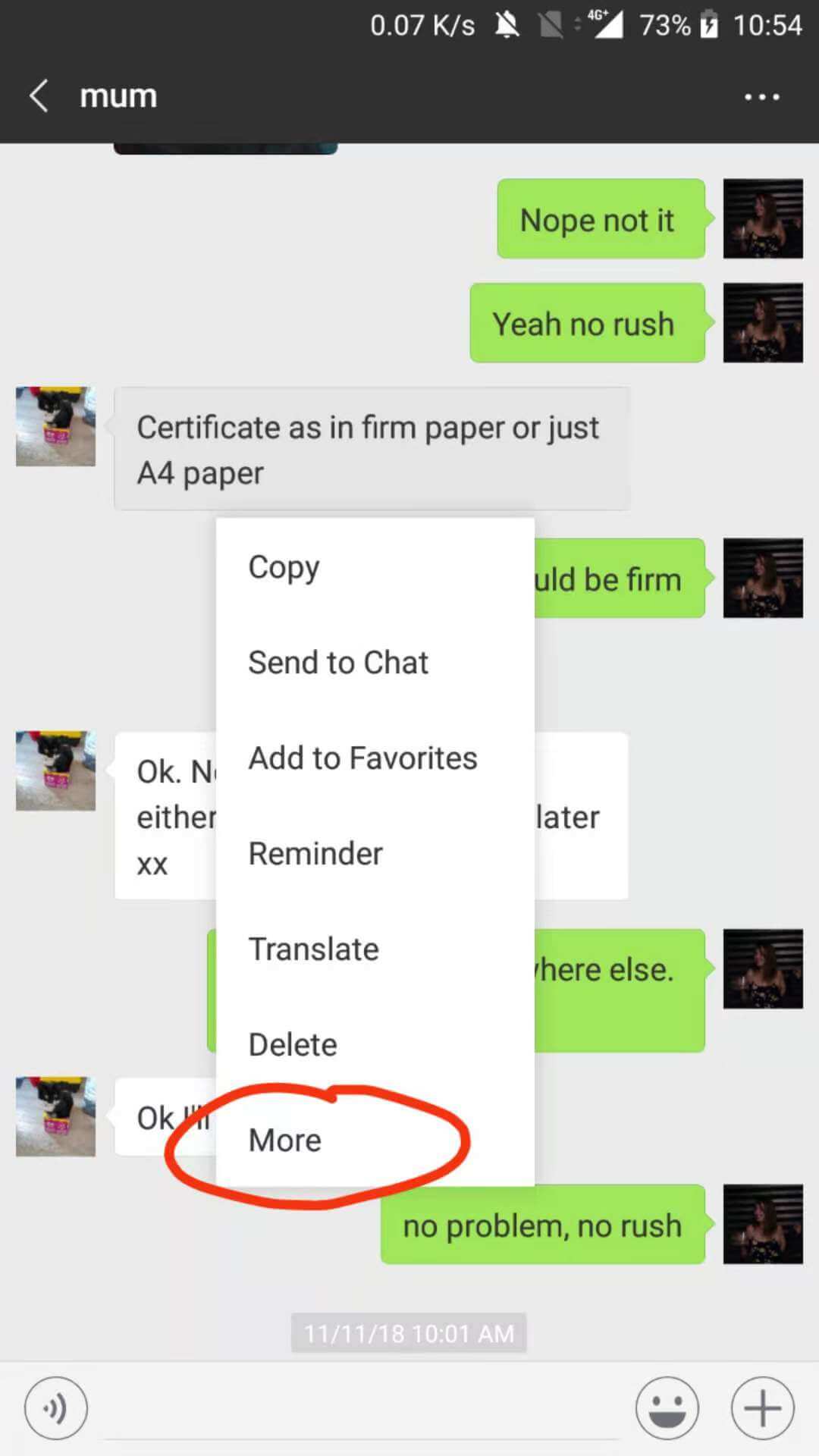
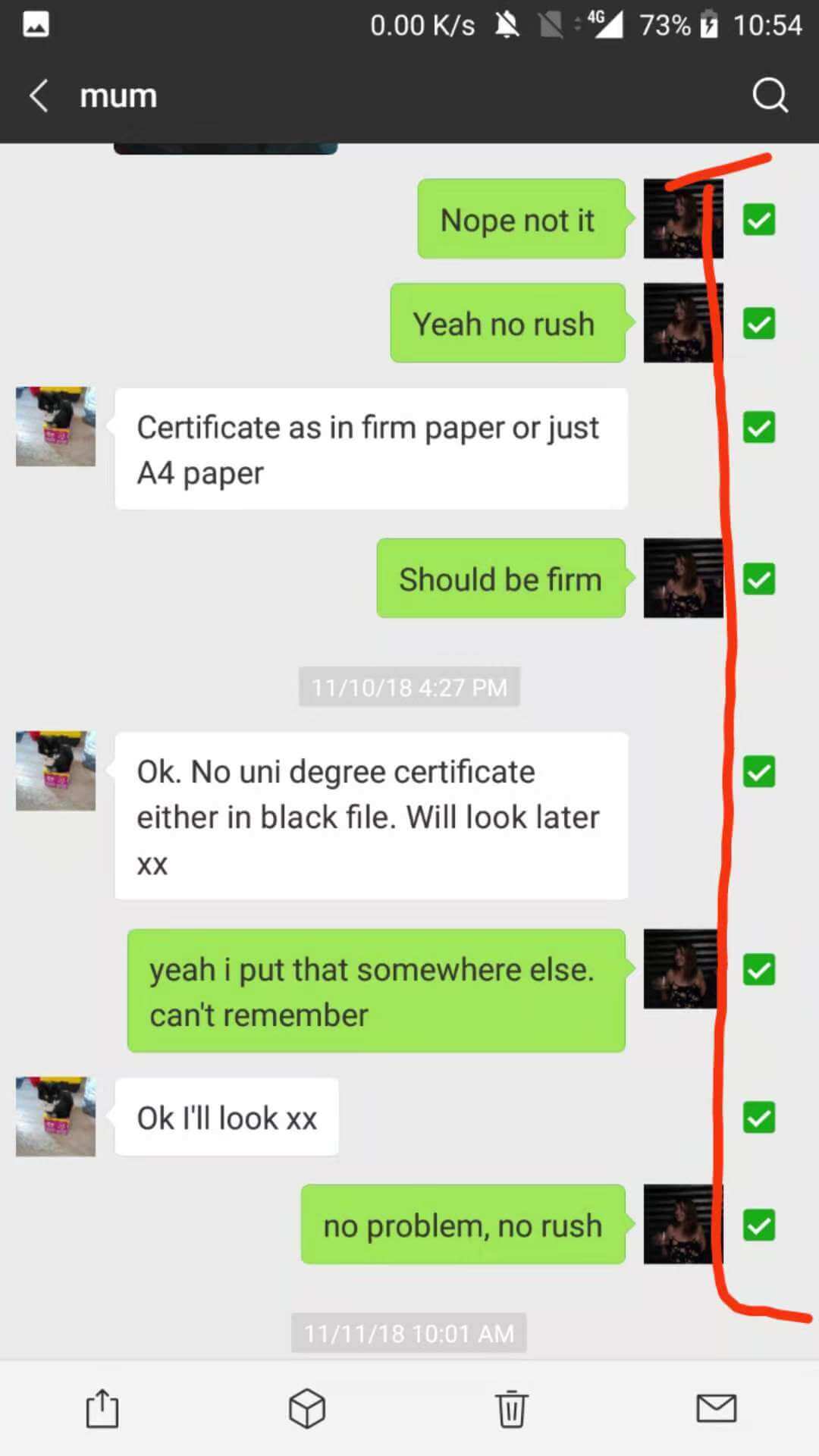
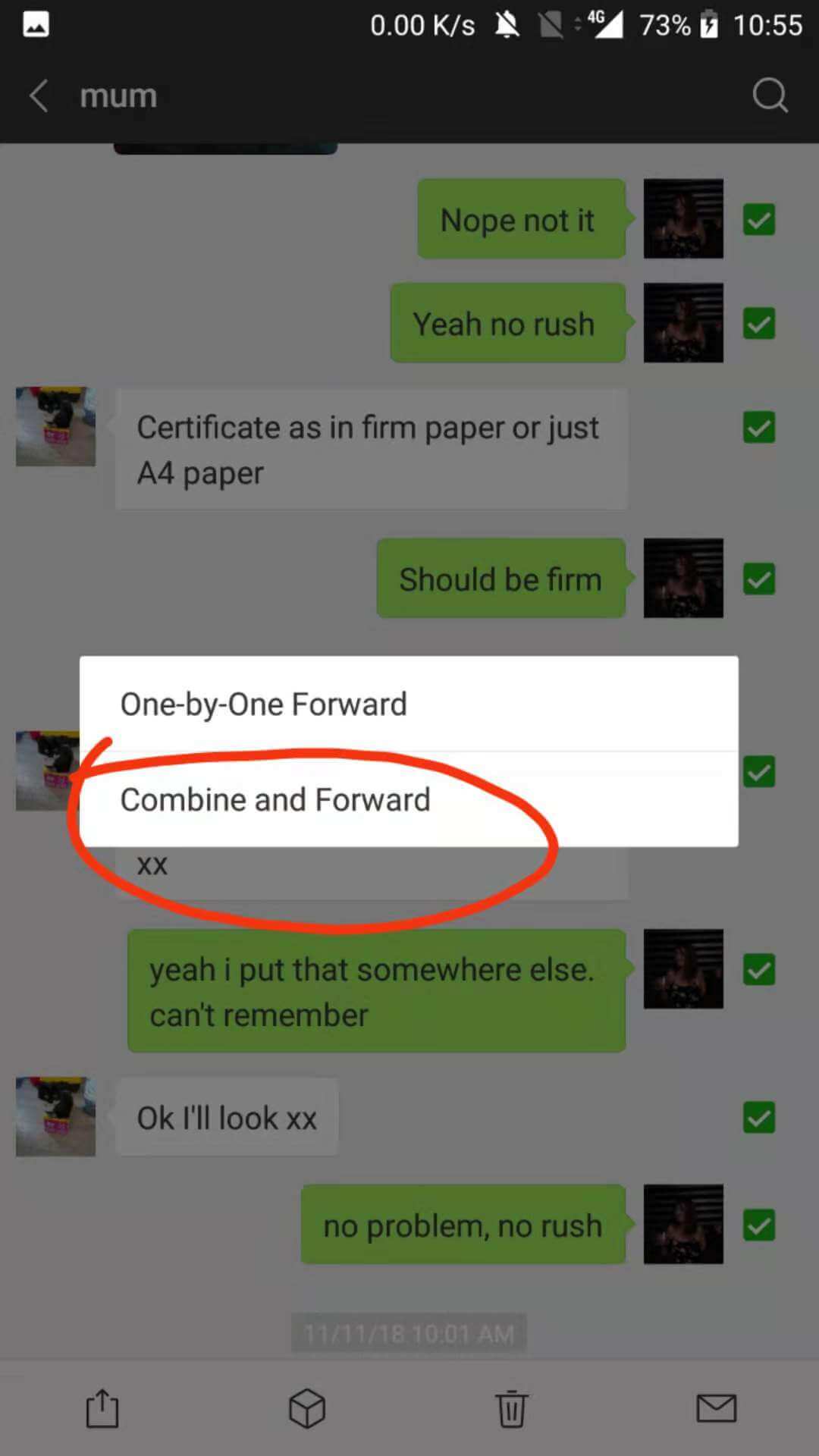
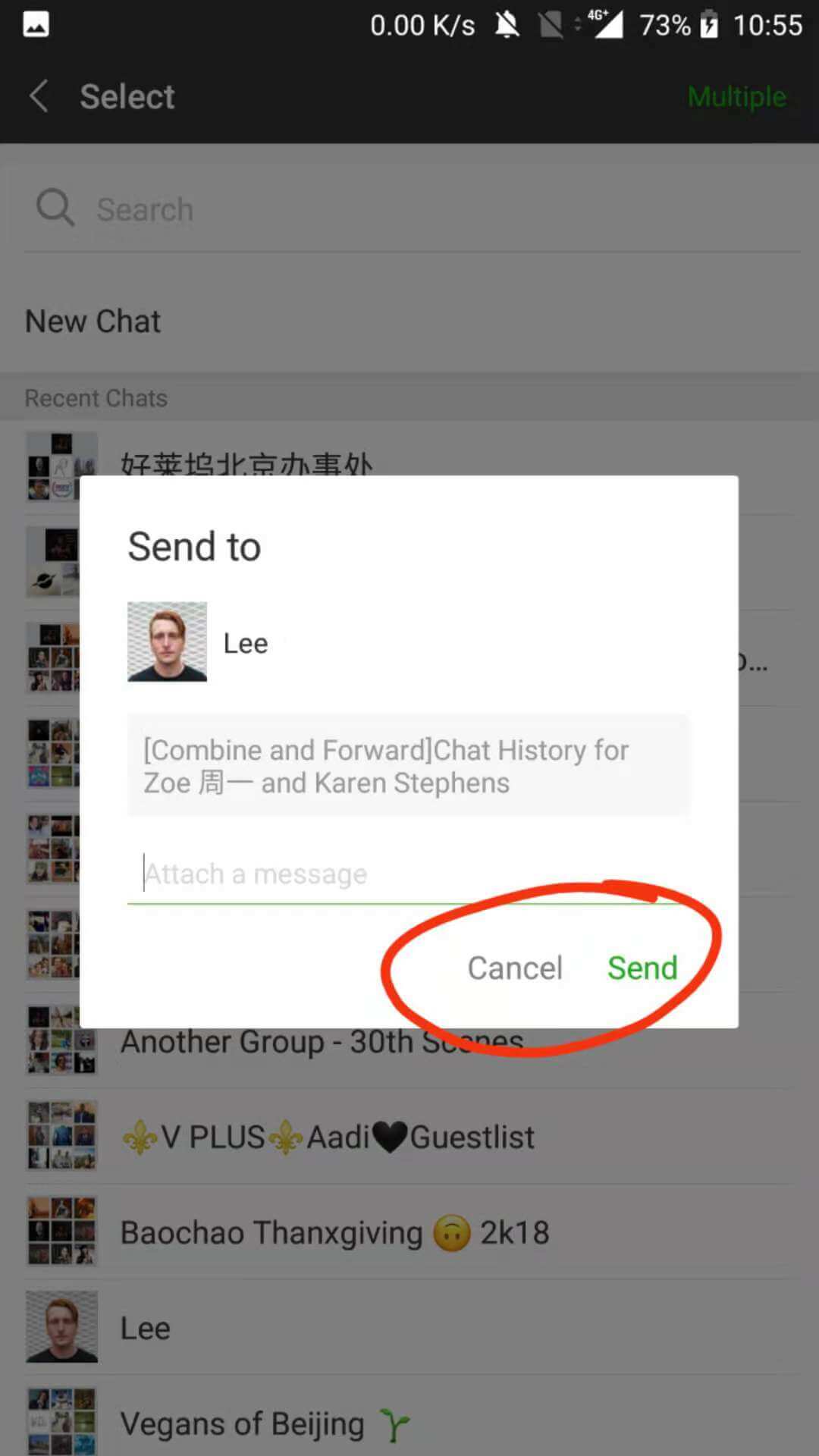
Above all, with great power comes great responsibility. Please use this feature for good, not evil.
WeChat Group Chats || How to Create and Manage Them
Group chats in WeChat (群聊, Qúnliáo) are where a lot of daily life in China actually happens: classes, flat-shares, work teams, language exchange groups.
Creating a group
- In the Chats tab, tap the compose/edit icon (top right).
- Select New Group Chat.
- Choose contacts to add (you need at least 2 others to start).
- Tap Done and name your group.
Useful group chat features
- @ mentions: Type @ followed by a name to alert a specific member.
- Save to Contacts: Pin important groups so they appear at the top of your chat list.
- Group QR code: Share a group QR code and anyone can join without individual invites (you can set an expiry on the code).
- Mute notifications: Long-press the group chat and mute if the messages get overwhelming.
Voice and Video Calls on WeChat
WeChat’s voice and video calls work over WiFi or mobile data, making them a genuine free alternative to international phone calls. Quality is generally solid, though it can vary on slower connections.
How to make a call
- Open a chat with the contact you want to call.
- Tap the phone icon (top right of the chat screen).
- Choose Voice Call or Video Call.
Group calls work the same way: open a group chat and tap the call icon to invite multiple people simultaneously.
TIP💡 Video calls on WeChat work well for staying in touch with family back home while you’re studying in China. The connection holds up better than many people expect, even on Beijing’s subway WiFi. 😄
Mini Programs || The App Store Inside WeChat
Mini Programs (小程序, Xiǎo chéngxù) are lightweight apps that run inside WeChat without needing a separate download. For tourists and expats, they are genuinely useful.
Common Mini Programs you’ll actually use:
- Didi (滴滴): Book taxis without needing the full Didi app.
- Meituan / Eleme: Food delivery straight to your door.
- Airport and train services: Many stations have Mini Programs for ticket checking and queuing.
- Hospitals: Queue and pay for appointments at many Beijing and Shanghai hospitals via Mini Program.
- Retail: Major brands like Nike and Uniqlo have Mini Programs for browsing and purchasing.
To find one, tap the search icon at the top of WeChat and type the name, or scan a QR code that launches a Mini Program directly.
TIP💡 Ask your LTL teacher or host family which Mini Programs are essential in your city. Each city has its own local favourites.
WeChat Moments || The Social Feed
WeChat Moments (朋友圈, Péngyǒu quān, literally ‘Friends Circle’) is WeChat’s social feed. Think of it as a private Instagram visible only to your WeChat contacts.
- Post photos, videos, or links with a caption.
- Friends can like (with a heart) or comment.
- Only mutual contacts can see each other’s comments, so conversations stay semi-private.
To access it: tap Discover (bottom nav) then Moments.
For expats, Moments is surprisingly important socially. Your Chinese colleagues and classmates will post there, and engaging with their content builds genuine relationships faster than you might expect. 🤝
How to Use WeChat || Subscription Accounts

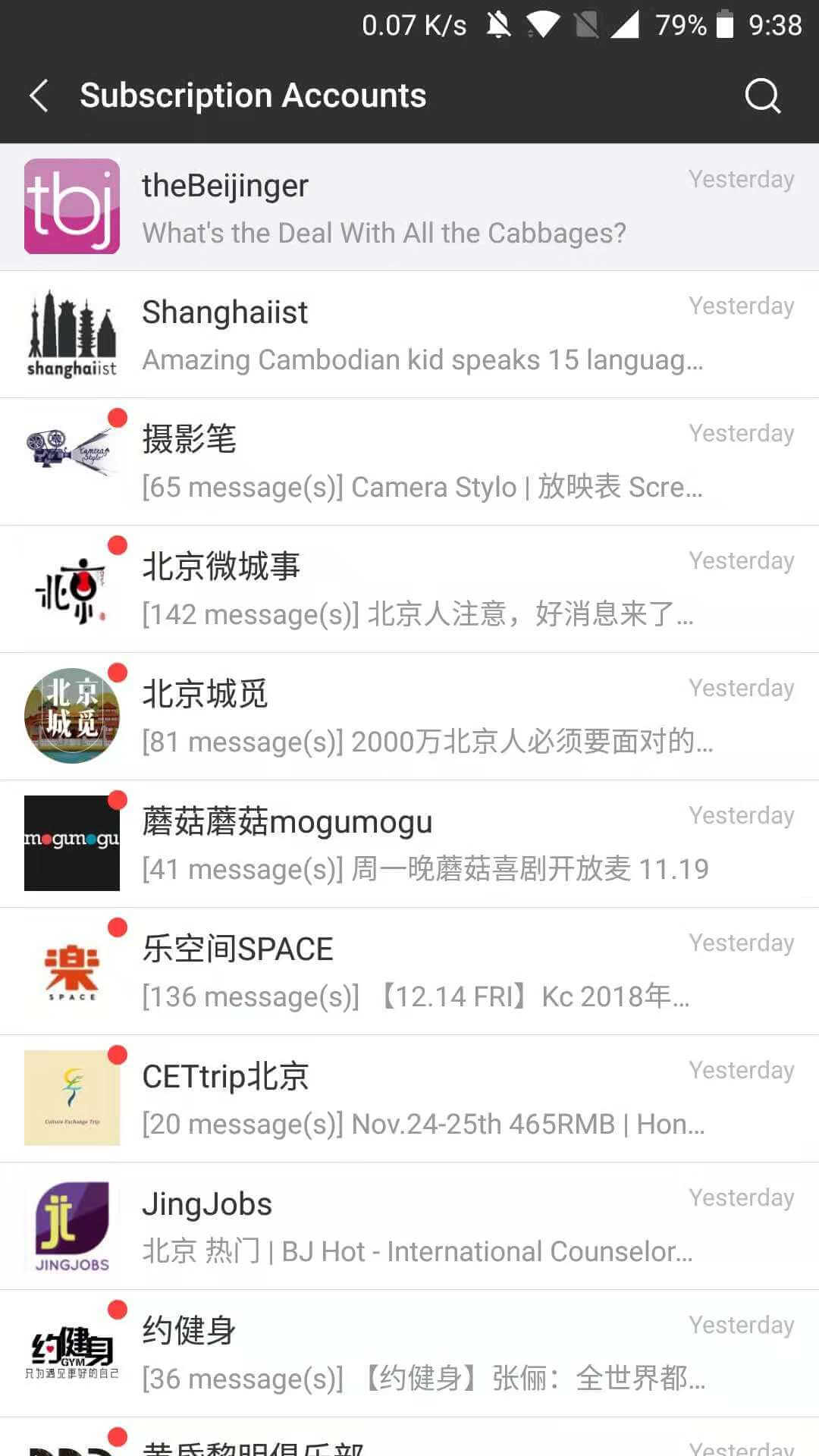
WeChat Subscription Accounts (订阅号, Dìngyuèhào) are official channels run by brands, media outlets, and individuals. Think of them as newsletters delivered inside WeChat.
For Mandarin learners, subscription accounts are genuinely useful:
- Many Chinese media outlets (including People’s Daily and local city accounts) publish daily articles perfect for reading practice.
- Language learning accounts post daily vocabulary, grammar tips, and cultural notes.
- LTL has its own WeChat presence where we share tips, class updates, and cultural content for students based in Beijing, Shanghai, and our other cities.
To follow a subscription account, search for its name or WeChat ID in the search bar, or scan its QR code. Your followed accounts appear under Chats > Subscriptions (a folded drawer at the top of your chat list).
TIP💡 Following a few Chinese-language subscription accounts is a low-effort way to build a daily reading habit in Mandarin. Even 5 minutes of reading on your commute adds up over a semester.

WeChat Account Frozen or Blocked? Here’s What to Do
It happens more often than you’d think, especially for newly registered accounts.
WeChat’s anti-fraud system flags accounts that send lots of messages quickly, add many contacts fast, or show unusual login locations.
Common reasons your account gets restricted
- You registered recently and WeChat flagged the activity as suspicious.
- A contact reported you.
- You logged in from an unfamiliar device or country without prior activity.
How to unfreeze your account
- Open WeChat and follow the on-screen prompt to begin verification.
- You’ll be asked to verify via a trusted contact: ask a WeChat friend (with a verified Chinese number) to scan a QR code from within the app. This is the most reliable method.
- If you don’t have a trusted contact yet, WeChat’s official support page (available via the Help Centre inside the app) offers an alternative ID-verification route.
TIP💡 The best prevention: build your WeChat network gradually when you first arrive. Add 5-10 contacts over a few days rather than 50 in an hour. If you’re in Beijing or another LTL city, your LTL classmates are a ready-made first network. 😄
Does WeChat Work Outside China?
Yes. WeChat works in most countries around the world. You can message, call, and use Moments from anywhere with an internet connection.
WeChat Pay functionality for foreign-registered accounts is more limited outside China, but the core communication features work globally.
If you’re back home between trips or studying online with LTL Flexi Classes, WeChat remains the best way to stay in touch with contacts you’ve made in Beijing or Shanghai.
WeChat and Safety || What US Users Should Know
This is one of the most common questions we get, especially from American students preparing to study or work in China.
Here is the factual picture as of 2026:
- WeChat is available to download and use in the United States. There are no current federal laws prohibiting individual use.
- US government employees are advised against using WeChat on government devices. If that applies to you, follow your agency’s guidance.
- Like all messaging apps, WeChat collects data. Tencent’s privacy policy is publicly available. If data privacy is a concern, review it before signing up.
- Many US travellers, students, and business professionals use WeChat routinely for communication with contacts in China.
TIP💡 Our practical advice: if you’re visiting China or studying Chinese, you need WeChat. Use it on a personal device, apply the same digital hygiene you would on any social platform, and enjoy one of the most functional apps on the planet.
Can I use a US credit card in WeChat Pay? Yes, Visa and Mastercard issued in the US can be linked to WeChat Pay for use inside China. Some US bank cards include extra verification steps. Debit cards generally work more smoothly than credit cards in our experience.
How to Use WeChat || … Just About Everything
Aside from all the cool stuff you can do on WeChat we went through here, you can also do… Just about everything.
So, we’re strong believers in WeChat in the WhatsApp vs WeChat debate so we may be a bit biased, but there’s so much you can use WeChat for to get the full use out of it.
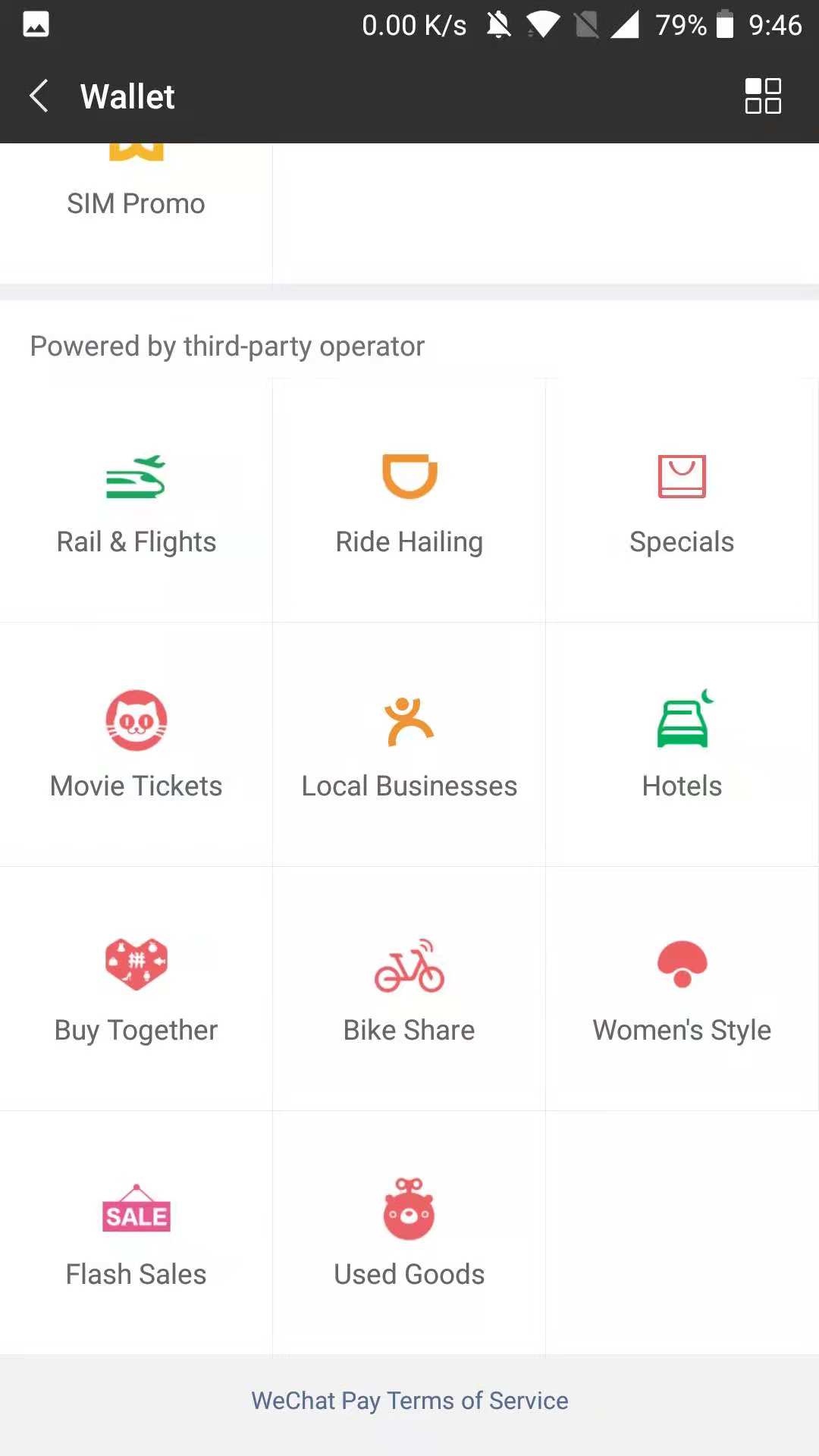
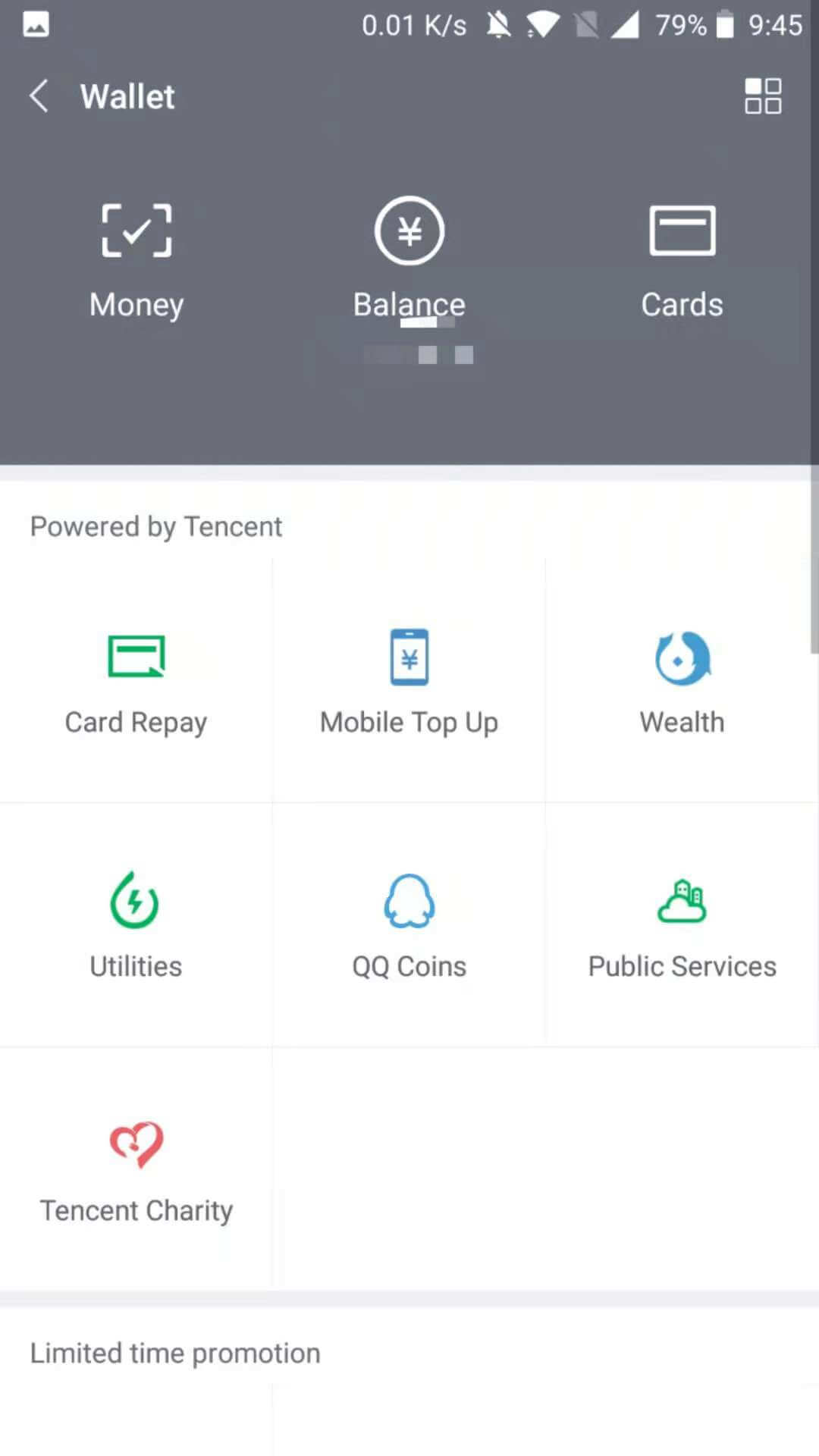
A large section is in the “me” section.
Have a browse and see what services would be useful for you! You can do everything from topping up your mobile phone, to hailing a cab, getting a share bike, shopping…. The list goes on!
How to Use WeChat || WeChat Download
Aside from all of the obvious things that make WeChat awesome and give it reason for being the most popular app in China, you now know about some other cool features you may not have known about before!
And this is just getting started.
How many did you know about before? Leave a message in the comments below!
Download WeChat now!
Once you’ve downloaded WeChat, you’ll also open up endless opportunities to sign up to other popular Chinese apps through your WeChat ID, such as Weibo! Don’t miss out…
WeChat Download Android
WeChat Download for Mac
How to Use WeChat || FAQ’s
What is WeChat?
A messaging app that is used throughout China.
The features are extensive however.
You can buy day to day goods, order taxi’s top up your mobile and do so much more inside WeChat.
Is WeChat the Chinese Whatsapp?
Essentially yes.
We compared the two, the similarities and the differences in this article.
Can I buy things using WeChat?
Yes, most people in China use WeChat to buy everyday things.
Can I use Whatsapp in China?
Whatsapp is blocked but you can still use it with a VPN.
Can foreigners use WeChat Pay?
Yes, foreigners can use WeChat Pay. From 2023, even tourists and short-terms visitors are allowed to link their international cards to WeChat and pay for things in China like a local!
For a step-by-step tutorial on how to use this feature, check out our WeChat Pay for Foreigners guide.
What are WeChat Mini Programs?
WeChat Mini Programs are lightweight apps built inside WeChat that let users do things like order food, book taxis, make payments, shop, or access services without downloading a separate app.
They open instantly within WeChat and are a key part of everyday life in China.
Can US citizens use WeChat?
Yes, US citizens can download and use WeChat freely.
It is available on the US App Store and Google Play. There are no federal laws prohibiting personal use as of 2026. US government employees should follow their agency’s device policies.
Which is safer, WeChat or WhatsApp?
Both apps collect user data. WhatsApp uses end-to-end encryption for messages by default.
WeChat does not apply end-to-end encryption in the same way, and messages may be accessible to Tencent under Chinese law.
Use the same digital hygiene you would on any platform: don’t share sensitive credentials or passwords via any messaging app.
How do I find people on WeChat?
You can find people by searching their Weixin ID, their phone number, or by scanning their personal QR code. Tap the ‘+’ icon in the top-right of the Chats tab to access all three options.
How to use WeChat for foreigners?
Download WeChat using any international mobile number, link a Visa or Mastercard for WeChat Pay, and use your Weixin ID to connect with locals.
The international version of WeChat works well for communication and payments inside China. See the registration and WeChat Pay sections above for full step-by-step detail.
Is it safe for Americans to use WeChat?
Millions of Americans use WeChat to stay in touch with contacts in China.
Apply standard data hygiene, review Tencent’s privacy policy, and use WeChat on a personal rather than work device if your employer has restrictions. Beyond that, it is a functional tool for anyone living or travelling in China.
Can I use a US credit card in WeChat Pay?
Yes.
Visa and Mastercard issued in the US can be linked to WeChat Pay for purchases inside China. Some US-issued credit cards face additional bank-side verification. Debit cards tend to link more smoothly. See the WeChat Pay for foreigners section above for the full setup steps.
Want more from LTL?
If you wish to hear more from LTL Mandarin School why not join our mailing list? We give plenty of handy information on learning Chinese, useful apps to learn the language and everything going on at our LTL schools!
Sign up below and become part of our ever-growing community!







17 comments
[…] WeChat is probably regarded as the most commonly used app to pay for things, AliPay will not be far […]
[…] WeChat Pay was developed as an additional feature within the instant messaging and social media app WeChat. […]
[…] creare un account usando il tuo WeChat e usare i loro modelli per creare un […]
Because it creates a lot of storage space issues, do you know how to resolve that? I don't want to lose most of what I have, but I don't know how to transfer the material, say, to my computer for future or any use.
Yes it does take up space but this is generally the case with a lot of widely used apps, Whatsapp and Spotify can do the same as well.
The best advice would be to clear chats you don't use often, use WeChat for Mac or Windows and save documents to your computer directly from there, then delete from your phone conversations.
Doing this once a month should keep storage in check for you Dusan.
Can I use voice typing when I am on a video call with my friend? I try it and it will not work. Am I doing something wrong?
In many ways I am somewhat of a simpleton regarding computer actions. Can you describe step by step how I may do this?
Which steps are you struggling with Dusan?
I have a PC and laptop either of which I want to transfer the pics, articles and some talk over to in order to preserve them (and hopefully access them), then to delete them from WeChat on the iPad devices, thus making massive amounts of storage space free again. I don't know if I can do all that safely onto a non-iPad unit. Also, if I can do all that, how can I access them to view, if not to transfer elsewhere into some more permanent file. I have heard previously any transferring simply loses the material.
Then I am unsure of the proper steps to take if I am able. I imagine something like creating a file first on the unit, then somehow transferring the various files. But WeChat seems to be very specific about access, like one at a time log-ins, so, not seeing actual steps to take, I become more unsure about losing stuff. Some superb stuff in this case.
And thanks for bothering with me so far.
Oo that's a little tricky. I think the best thing to do is use WeChat for Desktop and save all your files on your computer from there.
Chats I don't think you'll be able to export and have in a readable format in truth. Files you can definitely save. Just make sure when you open WeChat on your computer to check the "Sync Messages" so all your messages appear as it would on phone/iPad
Probably my biggest concern is for the pictures and videos, most of which were from trips and are only on WeChat, and maybe the moments of others which include similar things. Would those be salvageable in their otherwise pristine form?
Difficult to say. Media expires on Wechat after a certain amount of days so you'd best do that sooner rather than later. Save to your computer if it still lets you save the media.
Tried it, but a different menu pops up. No „convert to text“. And can’t forward voice messages either.
Voice messages indeed cannot be forward.
Hi how do I use video call someone and text them the same time on my iPhone
You can make the video window smaller and then move around in the app whilst talking to your friend in a smaller window.
[…] keep a record of these corrections, use messaging platforms like WeChat or WhatsApp and get them to send you the corrected […]